Best AI Agent Builder Platforms for Security Teams in 2026: 10 Compared and Scored
A practitioner’s comparison of 10 platforms for building, customizing, and operating security agents.



TL;DR
Creating an agent is only the beginning. The real test is whether your team can trust it to do useful work across your environment. That means giving it the right context, limiting its permissions, inspecting its actions, and changing its behavior without losing control of production.
This guide compares Blink, Tines, Bricklayer AI, Airrived, Cotool, n8n, Alaris Security, Strike48, Mindflow, and Kindo. Blink leads our shortlist because it combines a customizable security agent builder with broad response integrations, transparent execution, and prebuilt solutions that teams can extend.
The comparison gives substantial weight to customization and executable integrations, while also scoring governance, visibility, prebuilt security content, and the development lifecycle. A ready-made agent, a workflow template, and an operational security solution receive different treatment.
We build Blink, and this guide reflects our priorities. The ratings are an editorial assessment of public product evidence, not a hands-on benchmark or a measurement of agent accuracy.
What Is an AI Agent Builder Platform for Security Teams?
An AI agent builder platform lets a security team define an agent’s responsibilities, connect its tools and knowledge, and control its authority. The team can then deploy it into repeatable work. The team should also be able to inspect a run, identify what went wrong, and update the agent.
At Blink, the builder is part of an Agentic Security Operations Platform. Agents, workflows, integrations, case management, and governance share the same foundation.
A team can start with a prebuilt solution from the Blink AI SOC and customize it. Or it can build a new agent for a process unique to its environment.
The useful question is how much of that operating model the platform provides. A prompt editor may change an agent’s instructions. A workflow generator may produce a fixed sequence of steps.
A fuller builder also controls tools, context, triggers, permissions, and deployment. Those capabilities determine what the security team can own after the demo.
What Your Team Should Be Able to Change
Your team should be able to change an agent’s role, allowed actions, organizational knowledge, output requirements, and escalation behavior. Ask whether agents can collaborate and whether deterministic workflows can enforce the steps that must happen in a defined order.
For example, an identity investigation might use an agent to interpret unusual activity, then require a fixed approval step before revoking sessions. The response should leave a record of the request, authorization, execution, and resulting state. A written instruction to ask permission is weaker than a tool gate that actually blocks execution.
The OWASP GenAI Security Project’s Top 10 for Agentic Applications for 2026 lists tool misuse and exploitation (ASI02) and identity and privilege abuse (ASI03) among the most critical risks for agentic systems. Both describe agents using the tools or access they were given in ways their owners did not intend.
Customization also needs a lifecycle. When a team changes an instruction or tool, it should know which version ran, how the change was tested, and how to recover.
The NIST AI Risk Management Framework makes the same point: trustworthiness belongs in the design, development, use, and evaluation of AI systems.
Where Prebuilt Solutions Fit Alongside Custom Agents
Prebuilt solutions and custom agents should work together. Prebuilt content can shorten the path to a useful deployment, but it comes in different forms.
A connector exposes an action. A template connects several steps. A prebuilt agent adds a role and tools.
A packaged security solution brings those elements into an operational process, with context, routing, and oversight.
The strongest fit depends on what your team wants to own. Some teams want a platform on which they engineer every process. Others want working security solutions with the freedom to change the agents underneath them.
This comparison gives credit to both builder depth and the starting point the vendor supplies.
The 10 Platforms on Our 2026 Shortlist
Ten platforms made our 2026 shortlist, each documenting a way for security teams to build, customize, and operate agents. The platforms appear in editorial shortlist order. The scoring table provides the numerical comparison.
- Blink: Best for customizable security agents connected to prebuilt solutions and broad response automation.
- Tines: Good for teams building agents inside governed enterprise workflows.
- Bricklayer AI: Good for coordinating specialized security agents through reusable procedures.
- Airrived: Good for composing agentic applications with domain-specific models and prebuilt security apps.
- Cotool: Good for turning investigation expertise into recurring detection and response agents.
- n8n: Good for technical teams assembling flexible agents and evaluating their workflows.
- Alaris Security: Good for extending native security operations with custom agents and shared context.
- Strike48: Good for security and IT teams combining custom agents, Model Context Protocol (MCP) tools, and controlled execution.
- Mindflow: Good for teams connecting conversational agents to a broad automation catalog.
- Kindo: Good for building and maintaining agents across SecOps, DevOps, and IT operations.
How the Platforms Compare at a Glance
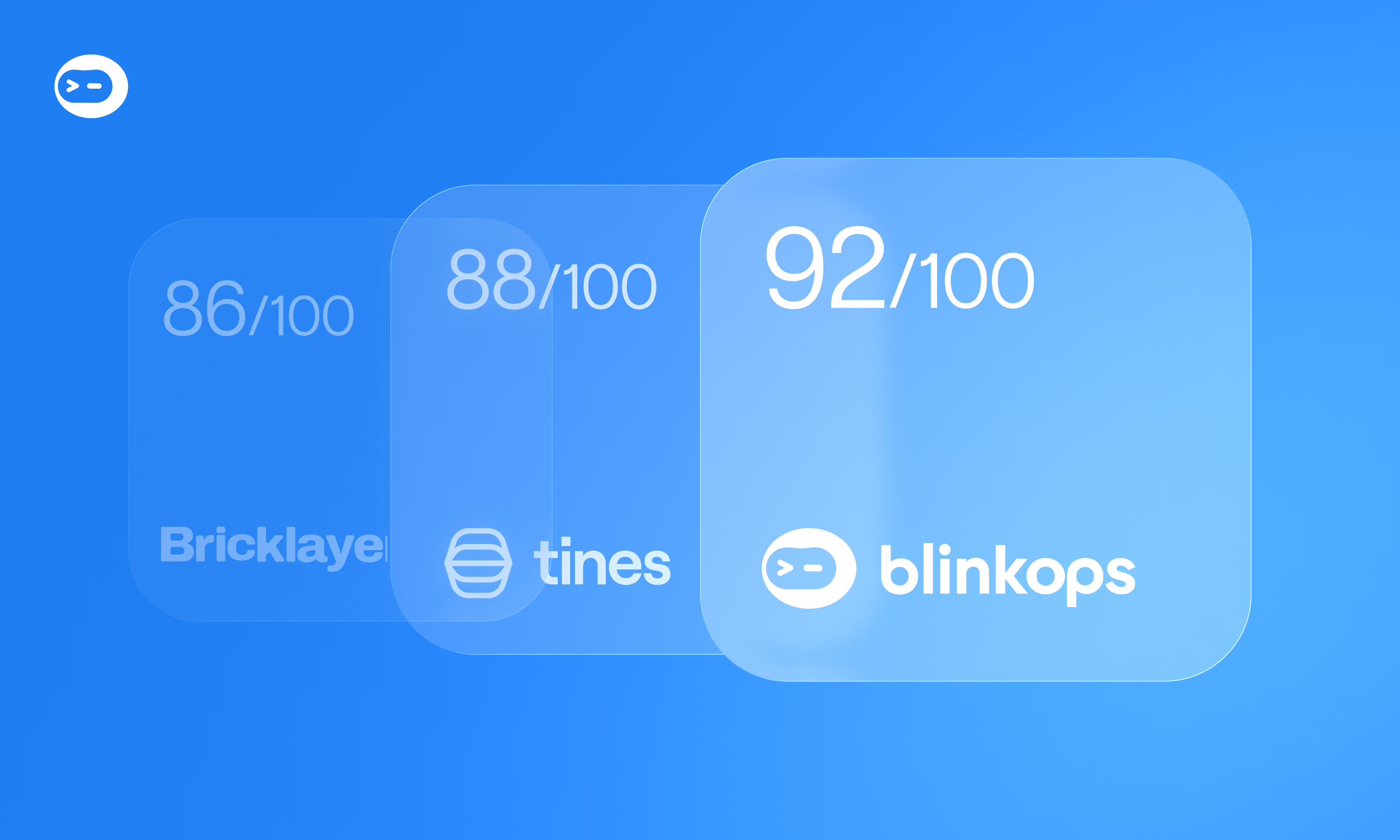
Blink scores highest at 92/100, and every other platform lands in the four-star band between 77 and 88. The table summarizes each builder approach, its documented strength, and what to establish in a pilot.
Ratings describe fit for the rubric below. They do not establish that a 92-point platform produces more accurate decisions than an 88-point platform. Sources and qualifications appear in each review.
How We Scored Each Platform
Each platform received a weighted score out of 100 across six criteria, based on public evidence. We reviewed public vendor documentation, product pages, and technical articles on October 21, 2026, using SecOps Unpacked’s independent public directory to help identify the relevant products. Scores reflect documented capability and our judgment about its relevance to a security team operating custom agents.
The Six Weighted Criteria
Integration counts are not directly comparable: vendors count products, actions, endpoints, and connectors differently. We assess the documented ability to perform useful work, while treating exact coverage as a pilot requirement.
How to Read the Scores
Each criterion receives a whole-number score from 1 to 5. The prebuilt criterion uses its own scale, and no vendor receives 5 on it in this review.
Where evidence is thin, the score is provisional; a low score is not proof that a feature is absent.
The weighted score is the sum of each criterion’s score divided by five and multiplied by its weight. Stars group the results: 90-100 = ★★★★★; 75-89 = ★★★★; 60-74 = ★★★; 40-59 = ★★; below 40 = ★. Small numerical differences should not outweigh a decisive capability in your environment.
The 10 AI Agent Builder Platforms for Security Teams, Reviewed
Each review covers what the platform does, why it stands out, what to validate, and one pilot test you can run.
1. Blink: Best for Customizable Security Agents and Broad Response Automation
Score: 92/100 · ★★★★★
Blink combines Agentic Studio with the workflows and integrations needed to turn an agent’s decision into an action. Teams can define specialized roles, attach operational knowledge, and combine agents with deterministic processes. The platform advertises more than 30,000 integrations; buyers should validate the specific operations behind that catalog.
Why it stands out. The prebuilt AI SOC can be customized at the level of agents, thresholds, and escalation paths. That provides a starting solution while preserving the ability to build for local requirements.
The Blink agent builder documentation covers workflow abilities, individual actions, MCP connections, draft testing, and publishing. Sensitive abilities can include approval steps, enforced by the platform harness rather than the prompt.
Transparency is a particular strength. Blink agent run logs expose task inputs, ability execution, status, and the version used. Teams can trace a failed response back to the execution that produced it.
What to validate. Test permissions and approval behavior in both interactive and automated modes. Confirm provider-specific knowledge support and execution limits; the documented agent limitations currently exclude agent Knowledge sources when Amazon Bedrock or Azure AI Foundry is the AI provider. Draft testing also needs to be complemented by your regression dataset.
Pilot test. Customize a prebuilt investigation, add a local response ability, deny approval, and inspect the complete record before testing the approved path.
2. Tines: Good for Agents Inside Governed Enterprise Workflows
Score: 88/100 · ★★★★
Tines places an AI Agent action inside its workflow environment. According to Tines documentation, teams can configure instructions, models, output schemas, and tools, including reusable Stories and remote MCP tools. Task and chat modes support different interaction patterns, a substantial builder capability.
Why it stands out. Change Control provides a clear development process: draft, test, review, and apply. Drafts can use test credentials, while live workflows remain protected from direct edits once the feature is enabled. These are valuable controls for teams maintaining their own security automation.
What to validate. Tines provides templates and reusable content, while customers still assemble their operational security solution. Also, Change Control must be enabled, and an external Story used as a tool has its own change-control scope. Check governance across the whole dependency chain, not just the parent agent.
Pilot test. Build an investigation using two reusable tools, change one linked Story, and demonstrate which review and test steps protect the live agent.
3. Bricklayer AI: Good for Coordinating Specialized Security Agents
Score: 86/100 · ★★★★
Bricklayer organizes agents around security roles, tool expertise, and reusable procedures. According to its platform materials, customers can choose prebuilt agents or create custom ones, then coordinate their work around an operational objective. Shared context helps connect tasks across an investigation.
Why it stands out. The Workbench makes a procedure inspectable: analysts can review inputs and outputs, question a finding, modify the work, and rerun tasks. That is useful when building an agent means refining how a team of specialists investigates a problem.
Bricklayer also documents conversational configuration of agents and procedures, with actions outside granted permissions blocked and logged.
What to validate. Its coordination and execution visibility earn strong scores. The reviewed material provides less detail about formal regression datasets and promotion between development and production, which limits the lifecycle score. Ask how a procedure change is reviewed, versioned, recovered, and propagated to dependent agents.
Pilot test. Change one agent’s procedure in a shared investigation, inspect the impact on the other agents, and recover the previous behavior.
4. Airrived: Good for Composing Agentic Applications
Score: 83/100 · ★★★★
Airrived combines prebuilt agentic applications, a custom agent layer, and tools for deeper model customization. Its platform materials describe visual composition, domain-specific models, and orchestration involving external agents.
Why it stands out. Its App Store approach covers security operations, identity, vulnerability and exposure management, third-party risk, and AI guardrails. Custom agents can be composed into applications rather than remaining separate experiments.
Airrived also describes human oversight, auditability, role-based access, and policy-based autonomy for security workflows. These are relevant capabilities for teams seeking a platform across several security functions.
What to validate. Public product pages establish a broad proposition. They leave more questions about the exact operator experience for regression testing, change approval, and rollback. Fine-tuning is a capability to assess against a concrete need; it is not evidence that an agent will produce better decisions.
Pilot test. Modify a prebuilt application with your own agent and restrict one action. Then demonstrate how testing, permissions, and version recovery work across the combined application.
5. Cotool: Good for Turning Investigation Expertise Into Recurring Agents
Score: 77/100 · ★★★★
Cotool connects conversational investigation with customizable security agents. Its public platform describes turning a conversation into an always-on agent, creating response procedures in natural language, and inserting human review into execution.
Why it stands out. Evaluation and monitoring are part of the product proposition, alongside version control and agent memory. Cotool also connects detection development and response: detections are editable Python, and the platform describes tuning them using investigation outcomes.
This makes it an interesting option for teams that want to capture an analyst’s investigation method and reuse it continuously. Its score recognizes that focused security workflow, rather than assuming the breadth of a general enterprise agent platform.
What to validate. The reviewed material is less detailed about expansion beyond detection, investigation, and response. Ask what the evaluation harness measures, who defines a correct result, and whether a change improves performance across a representative dataset. Automatic evaluation alone does not establish accuracy.
Pilot test. Convert a completed investigation into an agent, replay known cases, and inspect a suggested improvement before accepting it.
6. n8n: Good for Technical Teams Building Flexible Agent Workflows
Score: 85/100 · ★★★★
n8n gives builders a flexible workflow environment for connecting agents, tools, and application logic. According to n8n documentation, its tool approval mechanism can pause a proposed action, show its parameters to a reviewer, and either execute or cancel it. Human review also works when an agent is used as another agent’s tool.
Why it stands out. Evaluation is documented as a repeatable workflow process. Teams can run known inputs through a workflow, compare outputs, and use metric-based evaluations to track quality as prompts or models change. That earns a strong lifecycle score.
What to validate. A flexible builder leaves substantial security design work with the customer. Your team must define investigation procedures, organizational context, evidence handling, and response verification. The lower prebuilt score reflects that assembly burden, not an absence of templates or agent functionality.
Test the controls as deployed. The availability of an approval node does not mean every consequential tool path uses it. Likewise, an evaluation feature needs a dataset and success criteria that represent real security work.
Pilot test. Build one investigation with nested agents, block a response action, and run a regression dataset after changing the prompt.
7. Alaris Security: Good for Extending Native Security Operations
Score: 83/100 · ★★★★
Alaris Build Suite lets teams compose agents from prompts, tools, and triggers, while using the platform’s Security Graph, alert data, and response capabilities. Custom agents operate alongside native agents.
Why it stands out. The documented control model is explicit. It includes read-only defaults, scoped client credentials, approval gates for response actions, and test runs that expose execution steps. The platform also describes versioned changes and logs of tool calls and decisions.
Its build-your-own-agents workflow includes attaching internal tools through MCP and turning local procedures into reviewable specifications. That can reduce the work required to connect a custom agent to an existing security operating environment.
What to validate. Establish the precise actions and connectors available to your agent, and how custom tools inherit permissions and approval requirements. A shared graph is useful only if the entities, relationships, and evidence needed for your use case are present and current.
Pilot test. Connect an internal enrichment tool, create a read-only agent, and demonstrate that a proposed containment action cannot bypass approval.
8. Strike48: Good for Custom Agents With Controlled Tool Execution
Score: 88/100 · ★★★★
Strike48’s Prospector Studio combines agents, workflows, knowledge, and MCP tools for security and IT operations. Its platform page describes custom agent construction alongside packaged use cases and several deployment options.
Why it stands out. Strike48’s technical release notes describe a concrete approval model with automatic approval, soft blocking, and hard denial. Checks run before tool execution. They also document audit visibility, credential handling, and multi-tenant controls.
What to validate. The platform page distinguishes examples that are prebuilt from ideas that can be developed. Confirm which agents actually ship.
Its onboarding checklist also assigns initial agent and workflow configuration to Strike48, with testing shared between vendor and customer. Establish what your team can maintain independently after that setup.
The score reflects strong builder and execution-control evidence. Your pilot should still demonstrate those controls in the deployment model and connectors you intend to use.
Pilot test. Give an agent one approved tool, one approval-required tool, and one denied tool, then inspect the record of all three paths.
9. Mindflow: Good for Connecting Agents to Broad Automation Coverage
Score: 84/100 · ★★★★
Mindflow combines conversational AI Rooms with agents and automation flows. Its public product describes approved actions, credential-scoped permissions, and records showing the endpoints called, inputs sent, and responses received. Those are useful foundations for agents that execute work across many systems.
Why it stands out. The automation layer supports custom scripts, reusable subflows, flow versioning, and step-level logs. These building blocks help teams combine predictable processing with agent-driven interactions.
What to validate. Broad integration coverage and reusable content do not automatically provide a complete security solution. Confirm which agent behaviors, context, escalation paths, and response checks are supplied for your use case.
Also distinguish flow versioning from evaluation of the agent’s decisions: being able to restore a flow does not prove the restored agent behaves correctly.
Mindflow earns strong action and visibility scores. The remaining question is how much of the security operating process your team must create around those capabilities.
Pilot test. Start from a reusable flow, add a conversational agent and approval gate, then change the agent and compare results against the earlier version.
10. Kindo: Good for Maintaining Agents Across Security and IT
Score: 79/100 · ★★★★
Kindo supports triggered agents, workflow agents, and chatbots. According to Kindo documentation, builders can configure instructions, tools, knowledge sources, and steps, including different models for individual steps. The documentation describes both integration events and direct webhook triggers.
Why it stands out. Agent versions are captured on save, with a read-only version viewer and restore support. Restoring a version does not restore historical sharing permissions or secrets, and restored triggers must be explicitly re-enabled. Those details matter when recovering an agent without unexpectedly resuming old automation.
Kindo also documents organizational settings for models, integrations, access controls, data protection, and a secrets vault.
What to validate. This is a builder-led proposition. Confirm which security agents and operating procedures are supplied, and demonstrate action-level approval and evidence retention in your intended workflow. Version recovery deserves credit, but it still needs tests of the restored behavior and its current external dependencies.
Pilot test. Build an event-triggered agent, change its tools, restore an earlier version, and verify permissions and trigger state before re-enabling it.
How Do You Tell a Useful Builder From a Polished Demo?
A production-ready security agent holds up when your team changes it; an impressive demo only shows the vendor’s path. Ask the vendor to start with a process from your environment and let your team change it. A builder should make the consequences of those changes visible.
Keep the evaluation of integration breadth practical. Ask whether the agent can query the required data, perform the exact response action, and verify the resulting state. A successful API request is not always a successful operational outcome.
Visibility deserves the same scrutiny. A readable explanation helps an analyst understand the result.
The more useful audit record includes the actual tools invoked, parameters, returned data, errors, approvals, and timestamps. An agent’s explanation is not a substitute for execution evidence.
What to Build During a Pilot
A pilot should prove that your own operators can build, break, fix, and maintain an agent on a real process. Use one repeatable investigation and one cross-team process.
For example, investigate a suspicious identity event. Then build a vulnerability follow-up agent that identifies the owner, gathers context, opens a remediation task, and verifies completion. These are suggested evaluation scenarios, not claims that every platform supplies them prebuilt.
Define the result. Write down what a correct outcome looks like, the required evidence, the allowed actions, and when the agent must stop.
Start with the supplied content. Record which agents, workflows, and integrations already exist and what your team must create.
Add local requirements. Introduce an internal system, a business exception, and an approval rule. Have your own operator make the changes.
Test failure deliberately. Use expired credentials, missing context, rejected approvals, and a tool that returns an unexpected result. Confirm the agent does not report completion incorrectly.
Inspect and improve. Trace the failure, change the agent, and rerun both successful and failed cases. Keep the expected outcomes stable enough to detect regressions.
Demonstrate ownership. Have a second operator inspect the configuration, recover a version, and maintain the process using the available documentation.
Measure setup work, correct outcomes, unsupported conclusions, blocked unauthorized actions, completeness of execution records, and maintenance effort. Time to generate an agent is a secondary metric if the team cannot safely operate what was generated.
Also establish the delivery model. Embedded engineering, onboarding assistance, and managed analyst services solve different problems. Ask who builds the custom integration, who maintains the agent, and who owns the ongoing operation.
A service can accelerate adoption, but it should not be confused with a feature your operators can use themselves.
Choosing the Right Platform for Your Team
The right platform depends on how much security engineering your team wants to own. Tines and n8n suit teams that want to assemble their workflows and invest in that operating discipline.
Bricklayer AI emphasizes coordinated security procedures; Airrived emphasizes composable applications and model customization; Cotool connects analyst expertise with recurring detection and response.
Alaris Security is relevant when custom agents should share the native security platform’s context and controls. Strike48 combines agent construction with tool execution controls and deployment flexibility. Mindflow connects agents to broad automation capabilities, and Kindo provides configurable agents with a documented version lifecycle across security and IT work.
Blink is our preferred starting point for teams that want prebuilt security solutions and extensive customization on one platform. It adds transparent agent activity and broad response automation. The builder lets the team shape the solution around its own processes as requirements evolve.
Bring a real process to the evaluation. Ask to modify the agent, inspect its work, enforce an approval, and verify the action’s result. Those steps reveal much more than the speed of a generated demo.
Blink lets your team start from a prebuilt AI SOC solution, then customize its agents, thresholds, and escalation paths for your own processes. Approval gates and run logs keep every agent action inside the harness and on the record.
Explore Blink Agentic Studio →
Frequently Asked Questions
What Is an AI Agent Builder for Security?
An AI agent builder for security lets your team define an agent’s responsibilities, connect its tools and knowledge, and control its authority. You then deploy it into repeatable work. A fuller builder also lets you inspect a run, identify what went wrong, and update the agent.
How Is an AI Agent Builder Different From SOAR?
Traditional security orchestration, automation, and response (SOAR) runs fixed playbooks: a defined sequence of steps. An agent builder adds reasoning agents that interpret evidence and choose among allowed tools. Deterministic workflows still enforce the steps that must happen in a defined order.
How Should AI Security Agents Be Governed?
Enforce authority at the action boundary with scoped access, approval gates that block execution, and denied tools the agent cannot bypass. A written instruction to ask permission is weaker than a platform-enforced control. Every run should record the tools invoked, parameters, approvals, and results.
What Should a Security Agent Pilot Prove?
A pilot should prove that your own operators can customize a real process and that unauthorized actions are blocked. Failures should never be reported as completions. It should also show that a second operator can inspect, recover, and maintain the agent using the available documentation.
Will AI Agents Replace SOC Analysts?
No. Agents act as a force multiplier for the existing team, handling repeatable investigation and response steps inside approved bounds. Analysts define correct outcomes, approve consequential actions, and own the process.


Related: