Partners & Integrations
INtegration

Agentic Integration for Cribl

Deploy AI micro-agents that hunt across your full-fidelity telemetry, recover the context your SIEM never ingested, and carry findings through to response with defined guardrails. Or build deterministic workflows for repeatable telemetry operations. Blink gives you both.

Agentify Cribl with Blink

Build micro-agents and agentic workflows that operationalize Cribl's telemetry layer across your entire stack. With BlinkOps, you can deploy purpose-built AI agents that hunt for TTPs and IOCs, verify SIEM alerts against raw telemetry, audit pipeline coverage, and dispatch approval-gated response actions. Start from one of our agent templates or build your own from scratch.

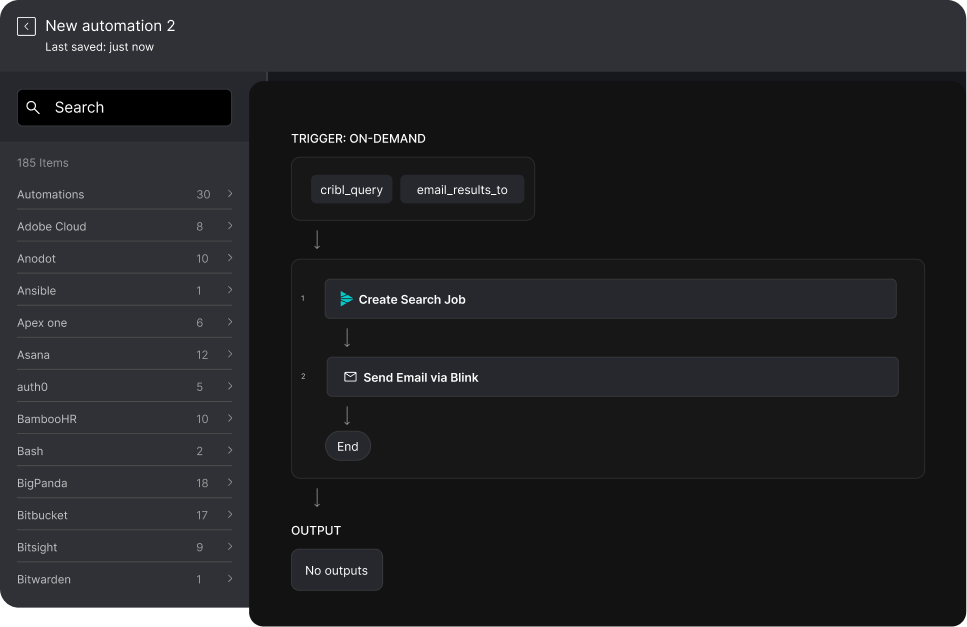
Blink provides 16 out-of-the-box actions and a Search Job Result trigger for Cribl, with connections to both Cribl Cloud and Cribl On-Prem. These actions serve as the building blocks for your agents and workflows, covering Search jobs, pipelines, outputs, functions, processes, users, and custom API calls. Cribl is the AI Platform for Telemetry, giving teams control over how security data is collected, shaped, routed, and retained across cloud and on-prem environments, including full-fidelity data the SIEM never ingested. Blink turns that telemetry access into hunting, investigation, and response.
View the Docs

Security Micro-Agents for
Cribl

With BlinkOps' No-Code Security Micro-Agent Builder, you can deploy purpose-built AI agents that reason through Cribl telemetry, make context-aware decisions, and execute response actions with defined roles and guardrails. Each agent is scoped to a specific domain, uses Cribl actions as its abilities, and operates within the constraints your team defines.

Threat Hunting

Threat Hunter Agent

Abilities (Cribl actions used):
Create Search Job
Create Search Job And Get Results
Get Search Job
Get Search Job Results Poll
List Search Jobs

Role:

Threat Hunter responsible for proactive TTP hunts and incident-driven IOC sweeps across retained telemetry.

What it does:

Hunts across everything Cribl Search can reach: Lake, object storage, and edge data the SIEM never ingested. The agent takes a hunt input, a TTP hypothesis or an IOC list from an active incident, translates it into targeted search jobs, iterates on the results, and returns structured findings with hit counts and time ranges. Same agent, two modes: proactive hunts on a schedule or analyst request, and incident-driven sweeps that scope blast radius from full-fidelity data instead of whatever the SIEM kept.

Constraints:

Read-only against telemetry. Does not change pipeline configuration, modify user accounts, or alter historical data. High-volume searches that could impact Cribl performance require human approval. Must provide the search queries and result evidence behind every finding.

SOC & Incident Response

Response Dispatcher Agent

Abilities (Cribl actions used):
Search Job Result (trigger)
Create Search Job And Get Results
Get Search Job Results Poll

Role:

Threat Responder responsible for carrying Cribl findings through confirmation and approval-gated response.

What it does:

Picks up where the investigation ends. Triggered by a new Cribl Search job result or a completed investigation, this agent runs a confirmation search against full-fidelity telemetry to validate the finding, then prepares response actions across the Blink-connected stack: isolate the host in your EDR, disable the account in your IdP, block the indicator at the edge, open the ticket. Cribl and its AI find and explain the threat. This agent makes sure something happens about it.

Constraints:

Every containment and remediation step runs behind an approval gate. The agent prepares the action and the evidence; the analyst approves the change. No response action executes autonomously. Must attach the confirming telemetry to every prepared action.

SIEM

SIEM Offload Investigator Agent

Abilities (Cribl actions used):
Create Search Job
Create Search Job And Get Results
Get Search Job Results Poll
List Outputs

Role:

Tier 2 SOC Analyst responsible for recovering full-fidelity context behind reduced SIEM alerts.

What it does:

Teams use Cribl to reduce SIEM ingest, which means the SIEM only sees a slice of the telemetry. When a SIEM alert fires, this agent goes back to Cribl Search for the full-fidelity raw data behind the alert, identifies the Stream outputs the data came through, and attaches the complete picture as evidence in Blink. Analysts investigate on everything that happened, not just what was retained, so cost optimization stops costing investigation depth.

Constraints:

Does not reconfigure SIEM ingestion or delete historical data. High-volume or long-running searches that could impact Cribl performance require human approval. Attaches source references so analysts can verify the underlying telemetry.

Telemetry Management

Telemetry Coverage Auditor Agent

Abilities (Cribl actions used):
List Pipelines
Get Pipeline
List Outputs
Get Output
List Processes
List Functions
Get Function
Delete Pipeline

Role:

Detection Engineer responsible for verifying that the telemetry sources detections depend on are actually flowing.

What it does:

Telemetry gaps are detection blind spots. This agent inventories pipelines, outputs, processes, and functions to verify coverage. It flags dead outputs, misrouted paths, and pipelines sending sensitive data where it should not go. If a pipeline needs removal, it prepares an approval request with the full configuration evidence and only executes Delete Pipeline after signoff.

Constraints:

Delete Pipeline requires multi-approval. Outputs and data are never removed without explicit human signoff. Configuration changes require human review. Reports every flagged gap with the pipeline and output evidence behind it.

Admin Access Auditor Agent

Abilities (Cribl actions used):
List Users
Get User
List Functions
List Pipelines

Role:

Admin Auditor responsible for auditing the Cribl admin plane in compliance and security reviews.

What it does:

Whoever controls the telemetry pipeline controls what your SOC sees. This agent audits who has access to Cribl, what functions exist, and what changed since the last snapshot. It builds an auditable inventory of users, functions, and pipelines for security reviews and compliance workflows and surfaces anomalies for analysts to act on.

Constraints:

Read-only. Does not modify user accounts or permissions. Any user changes require manual human approval. Every anomaly is reported with the inventory evidence behind it.

Featured Workflow: Search Finding Verification and Containment

This workflow demonstrates how BlinkOps combines AI micro-agents with deterministic workflow steps to carry a Cribl Search finding through to containment. The agent handles the reasoning. The workflow handles the execution.

Trigger
STEP 1

Agent, Finding Assessment (AI Reasoning)

  • The Response Dispatcher Agent receives the search job result payload and begins its assessment:

    1. Parses the search result and extracts the entities involved: hosts, users, indicators
    2. Runs confirmation searches via Create Search Job And Get Results to establish scope: how many hosts, how far back, is it still happening
    3. Sweeps the extracted indicators across retained telemetry in Lake and object storage for historical presence
    4. Checks via List Outputs and Get Output whether the affected sources are still flowing, ruling out a telemetry gap masquerading as quiet
    5. Evaluates severity based on: sensitivity of the affected assets, spread across hosts, duration of presence, and whether the activity is ongoing
    6. Assigns a verdict: BENIGN, SUSPICIOUS, or MALICIOUS
    7. Outputs a structured assessment with: verdict, affected entities, time range, confirming search results, reasoning, and recommended action
Cribl actions used in this step:
Search Job Result (trigger)
Create Search Job And Get Results
Get Search Job Results Poll
List Outputs
Get Output
STEP 2

Conditional Branch (Deterministic)

Based on the agent's risk score output, the workflow branches:
  • If verdict = BENIGN:

    • Log the finding and the agent's reasoning to case management
    • No further action
  • If verdict = SUSPICIOUS:

    • Create a case in ServiceNow or Jira with the search results and assessment attached
    • Send Slack notification to the security operations channel with the assessment
    • Log the event to case management
  • If verdict = MALICIOUS:

    • Send Slack notification to the incident response channel with the full assessment, entities, and time range
    • Isolate Host in CrowdStrike or SentinelOne, and Suspend User in Okta or Revoke User Sessions in Microsoft Entra ID (with human-in-the-loop approval)
    • Create a P1 case in ServiceNow or Jira with the agent reasoning, confirming telemetry, and evidence
    • Preserve the full Cribl search results as evidence attachments on the case
    • Log the event to case management
STEP 3

Documentation (Deterministic)

Regardless of verdict, the workflow:
  • Appends the agent's reasoning and assessment to the Blink case
  • Attaches the confirming search results and time ranges as evidence
  • Posts the final disposition to the operations channel
  • What This Demonstrates

    The agent handles the judgment call: given this search result, is it real, how far does it spread, and is it still happening? A hit on one staging host with a two-hour window is a different problem than the same indicator on twelve hosts over three weeks. The agent scopes on full-fidelity telemetry, not on whatever a reduced SIEM feed retained.

    The deterministic steps handle the execution: creating tickets, sending notifications, isolating hosts, and preserving evidence. These actions need to run the same way every time, with no variation.

    This is the hybrid model: agent reasoning plus deterministic reliability. The agent decides what to do. The workflow does it.

Cross-platform integrations used:
Cribl (search, telemetry confirmation, output verification)
CrowdStrike or SentinelOne (host containment)
Okta or Microsoft Entra ID (identity containment)
Slack (real-time notifications)
ServiceNow or Jira (case tracking)
Blink Case Management (operational tracking)

Automated Workflows for
Cribl

For structured, repeatable tasks that need to run the same way every time, Blink offers deterministic workflows built on the same Cribl actions. No reasoning required, just reliable execution on a defined path.

In the Blink library, we have compiled 8,000 automations that customers can download and run instantly. These automations include workflows for cloud security, compliance, identity & access management, network security, SOC & incident response, and threat hunting.

Available
Actions

Blink supports the following actions for Cribl:

Search

  • Create Search Job
  • Create Search Job And Get Results
  • Get Search Job
  • Get Search Job Results Poll
  • List Search Jobs

Custom

  • Cribl Custom Action

Pipelines

  • List Pipelines
  • Get Pipeline
  • Delete Pipeline

Users

  • List User
  • Get User

Trigger

  • Search Job Result: Listen for new Cribl Search job results and start workflows on them. Workflows check for new events every 5 minutes by default, adjustable in the trigger settings.

Outputs

  • List Outputs
  • Get Output

Functions & Processes

  • List Functions
  • Get Function
  • List Processes

Actions that change data routing, retention, pipeline configuration, or user accounts require explicit human approval before they run.

Frequently Asked Questions

  • 01

    What Does the BlinkOps and Cribl Integration Do?

    The integration connects Blink agentic workflows to Cribl so security teams can launch Cribl Search jobs, retrieve Stream outputs and pipelines, and pull full-fidelity telemetry directly into hunting, investigation, and response playbooks. Cribl shapes, routes, and retains telemetry. Blink orchestrates the agents and workflows on top, with human-in-the-loop control and auditable actions throughout.

  • 02

    Which Cribl Actions Does Blink Support?

    Blink supports 16 Cribl actions across Search (Create Search Job, Create Search Job And Get Results, Get Search Job, Get Search Job Results Poll, List Search Jobs), Pipelines (List Pipelines, Get Pipeline, Delete Pipeline), Outputs (List Outputs, Get Output), Functions and Processes (List Functions, Get Function, List Processes), Users (List Users, Get User), and a Cribl Custom Action for any endpoint not covered natively. Actions that change routing, retention, or configuration require explicit human approval.

  • 03

    Can Cribl Trigger Blink Workflows?

    Yes. The Search Job Result trigger fires a Blink workflow on every new Cribl Search job result. Workflows poll for new events every 5 minutes by default, and the interval is adjustable. This lets teams build automation that reacts to Cribl Search findings instead of only querying Cribl on demand.

  • 04

    How Does Blink Work With Cribl AI?

    They complement each other. Cribl AI and the agentic Cribl Search experience accelerate investigation inside your telemetry: building queries, exploring data, and explaining findings. Blink takes over at the finding. Through the Search Job Result trigger and Blink's integrations across the security stack, teams turn Cribl findings into approval-gated response and remediation actions in EDR, identity, network, and ticketing tools. Cribl answers what happened. Blink changes what happens next.

  • 05

    How Does Authentication Work for the Cribl Integration?

    Blink connects to Cribl over its REST API. Cribl Cloud connections use a Client ID and Client Secret with an API Address. Cribl On-Prem connections use a Username and Password with an API Address. In the Blink platform, go to Connections, add a Cribl connection, choose your method, enter the parameters, optionally test the connection, then create it.

  • 06

    Do the Cribl Micro-Agents Act Autonomously?

    No. Every Cribl micro-agent operates through pre-vetted, auditable skills with human-in-the-loop control. Agents will not delete pipelines, change routing or retention, or modify user accounts without explicit human approval. They surface evidence and prepare actions while analysts stay in control of decisions.

Connect to anything

Blink offers thousands of pre-built integrations across leading security vendors so you can start automating instantly.

Explore Integrations
Blink integrations - logos in a grid